

Run the CleanJet®+care or iCareSystem automatic cleaning cycle with genuine Rational detergent and Care tablets after every service. That single habit covers the vast majority of what this guide addresses. For the iCombi Pro, iCombi Classic, and SelfCookingCenter (SCC), the unit’s control panel does the thinking: it reads soiling levels, recommends the programme, and tells you exactly how many tablet packets to load. No guesswork, no improvised chemicals.
Quick reference before you read further:
- Automatic clean (standard): CleanJet®+care or iCareSystem cycle with Rational Detergent Tablets (part number 56.00.210) and Rational Care Tablets (part number 56.00.562)
- Interim/quick clean: Active Green cleaner tabs (part number 56.01.535), phosphate-free, approximately 12–22 minutes depending on model
- SCC/CombiMaster Plus cleaner tabs: part number 56.02.315U
- UK suppliers: Parts Town UK and Thecommercialovenstore
Pro Tip: Never substitute own-brand or generic cleaning chemicals. Rational’s warranty and the unit’s automated dosing logic both depend on genuine tablets. One wrong product can damage seals and void cover.
Key takeaways
The single most important rule in this Rational cleaning guide: run a genuine-tablet automatic clean after every service, use Care tablets every cycle, and never skip the daily drain and gasket check.
| Point | Details |
|---|---|
| Daily automatic clean | Run CleanJet®+care or iCareSystem with genuine Rational tablets after every service to prevent residue build-up. |
| Care tablets every cycle | Blue Care tablets protect the steam generator from limescale, especially in hard-water UK regions. |
| Quick interim cleans | Active Green tabs deliver a phosphate-free clean in approximately 12–22 minutes for fast turnarounds. |
| Log and escalate | Record tablet use and water hardness; book a professional descale if steam faults or persistent residue appear. |
| Buy genuine from authorised suppliers | Source Rational tablets and parts from authorised UK suppliers such as Thecommercialovenstore to protect warranty and performance. |
Table of Contents
- What do you need before starting a Rational clean?
- How do you run the CleanJet®+care automatic cleaning cycle?
- When should you use a manual or quick interim clean?
- How do Care tablets prevent limescale, and when do you need a service?
- What should you do when a cleaning cycle goes wrong?
- What does a full cleaning and maintenance schedule look like?
- Where can you buy genuine Rational cleaning products in the UK?
- What experienced kitchen technicians actually prioritise
- Thecommercialovenstore stocks Rational ovens, parts, and accessories for UK kitchens
- Sources
What do you need before starting a Rational clean?
Genuine cleaning products
Tools and PPE
- Chemical-resistant gloves (mandatory when handling tablets)
- Safety glasses or goggles
- Soft, non-abrasive cloths and a small brush for seals and drain edges
- Hand shower (if fitted to your unit)
- A soft pad for stubborn spots — no wire wool, no metal scrapers
Safety checks before you begin
- Allow the cabinet to cool fully before opening
- Remove all racks, trays, and accessories
- Wear gloves and eye protection before touching any tablet
- Never open the oven door during a running cleaning programme
- Check local water hardness if limescale is a recurring issue — more on that in the descaling section below
How do you run the CleanJet®+care automatic cleaning cycle?
Parts Town UK documents the full CleanJet®+care procedure: remove grids, select a cleaning cycle, add detergent and Care tablets as the screen requests, start the programme, and inspect for residue after completion. Here is the step-by-step sequence for iCombi Pro, iCombi Classic, and SCC models.
- Remove all trays, grids, and accessories from the cabinet. Check the drain at the base of the oven — clear any food debris before starting.
- Select the cleaning programme. On iCombi Pro and iCombi Classic, navigate to iCareSystem on the control panel. On SCC models, select CleanJet®+care. The display shows a cleanliness metre and recommends a programme level.
- Load detergent tablets into the fan/baffle basket as shown on screen. The unit specifies packets, not individual tablets — one packet typically contains multiple tablets, so follow the count the display gives you, not a rough estimate.
- Place Care tablets into the blue drawer. The blue drawer is usually located at the lower front of the cabinet interior. Rational iCombi Pro cleaning instructions confirm that care and cleaner tablets go in separate, specified locations — mixing them up reduces effectiveness.
- Close the door and start the programme. Step away. Do not open the door mid-cycle.
- After completion, inspect the interior. Wipe any remaining detergent residue with a damp cloth, rinse with the hand shower if fitted, and check the fan area, door gasket, and drain for residue or blockages.
Rational’s automated systems require genuine chemical tablets, and the unit’s prompts indicate the exact number of cleaning and Care tablet packets needed. Substituting other products disrupts this dosing logic.
Cycle times vary by soiling level and programme selected. A light programme runs faster; a heavy programme on a heavily soiled unit takes considerably longer. Plan your cleaning window accordingly — never start a cycle you cannot let run to completion.
Pro Tip: If a cycle is interrupted (power cut, door opened accidentally), do not assume the oven is clean. Restart the full programme. Partial cycles leave chemical residue and can damage door seals over time.
When should you use a manual or quick interim clean?
Prefer the automatic cycle every time. That said, there are two situations where manual or interim cleaning fills the gap.
Active Green quick cleans are the right tool when you need a fast turnaround mid-service. Rational states that Active Green cleaner tabs are phosphate-free, reduce chemical quantity by up to 50% compared with the previous formula, and enable an ultra-fast interim clean of approximately 12 minutes on iCombi Pro models. On other models, allow 12–22 minutes. These are not a substitute for a full end-of-service clean — use them to bridge between services.
Manual tasks that remain after any automatic cycle:
- Door gaskets: wipe with a damp cloth after every service; inspect for cracks or lifting edges weekly
- Inner glass: use an approved cleaner and a soft cloth; never a blade
- Drain edges and the drain cover: remove and rinse separately
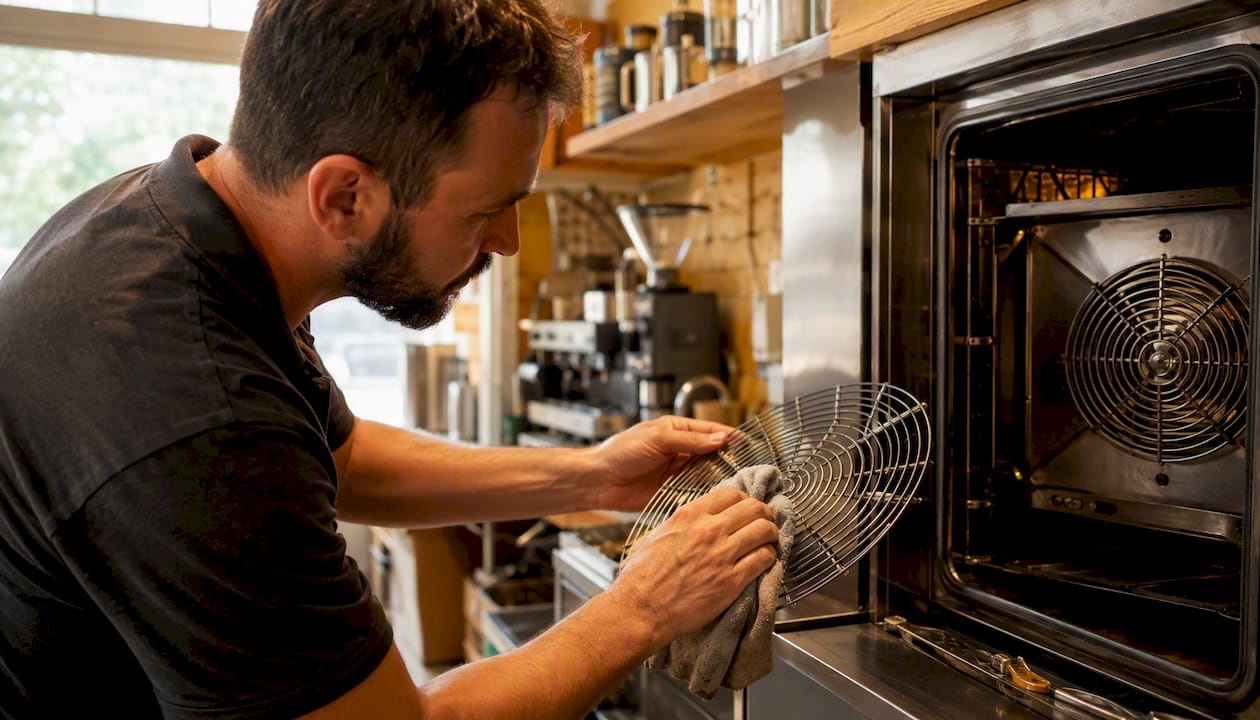
- Fan guard and fan blades: check for grease build-up weekly; wipe carefully with a soft cloth
- Runners and side rails: remove and wash in a sink with warm water and approved detergent
For stubborn baked-on residue on manual areas: cool the cabinet, apply a small amount of approved cleaner directly to the spot, allow a short dwell time (follow the product instructions), then wipe with a soft cloth. Light intervention takes a few minutes; heavy build-up on runners or the fan guard may take 15–20 minutes of careful work.
Pro Tip: Always wipe stainless steel surfaces in the direction of the grain. Cross-grain wiping leaves micro-scratches that trap grease and accelerate corrosion over time.
How do Care tablets prevent limescale, and when do you need a service?
Rational confirms that regular use of the iCareSystem and Care tablets protects the steam generator from limescale and helps extend the operational life of combi ovens. The blue Care tablets work inside the steam generator during every wash cycle — they are not optional in hard-water areas.
Practical prevention steps:
- Use Care tablets in every detergent cycle, as prompted by the unit
- Test your local mains water hardness. Much of southern England and the East Midlands sits in hard or very hard water zones, where limescale accumulates faster
- Where available, consider iCareSystem AutoDose, which handles chemical dosing automatically and reduces staff contact with tablets
- Log tablet usage and water hardness readings — this data helps a service engineer calibrate descaling intervals
Book a professional descale or service call when you notice any of these: persistent steam generation faults, slow or blocked drainage after a correct cycle, repeated residue despite proper cleaning, or visible scale inside the steam generator. These are not problems a cleaning cycle alone will fix.
Fitting Rational cleaning into a broader kitchen workflow is easier when the whole team understands the schedule. For operational context on daily kitchen routines, the food and lodging workflow guide from Wild Foodz covers efficiency planning across hospitality operations.
What should you do when a cleaning cycle goes wrong?
Short answers first, then the checks.
Common problems and immediate responses:
- Cycle fails to start: confirm the door is fully closed, check the water supply is on, and verify tablets are loaded in the correct locations
- Detergent residue after cycle: wipe with a damp cloth and run a rinse; if it recurs, check tablet placement and packet count against the display’s recommendation
- Poor steam or steam faults: check the water inlet filter and drain for blockages; if the fault persists, book a service call
- Odours after cleaning: inspect the drain cover and fan area for trapped food debris; clean manually, then run a fresh cycle
Step-by-step checks before calling for support:
- Confirm tablet placement matches the on-screen guidance (detergent in fan/baffle basket, Care tablets in blue drawer)
- Inspect the drain and drain cover for blockages
- Check the door gasket for damage or debris preventing a full seal
- Verify water supply pressure is within the unit’s specified range
- If residue persists after a correctly run cycle, select a stronger programme and run again
- If the problem returns after a second correct cycle, contact an authorised Rational service engineer
Do not substitute cleaning chemicals, bypass safety interlocks, or attempt to force a door open mid-cycle. Any of these actions can void the warranty and damage the unit.
What does a full cleaning and maintenance schedule look like?
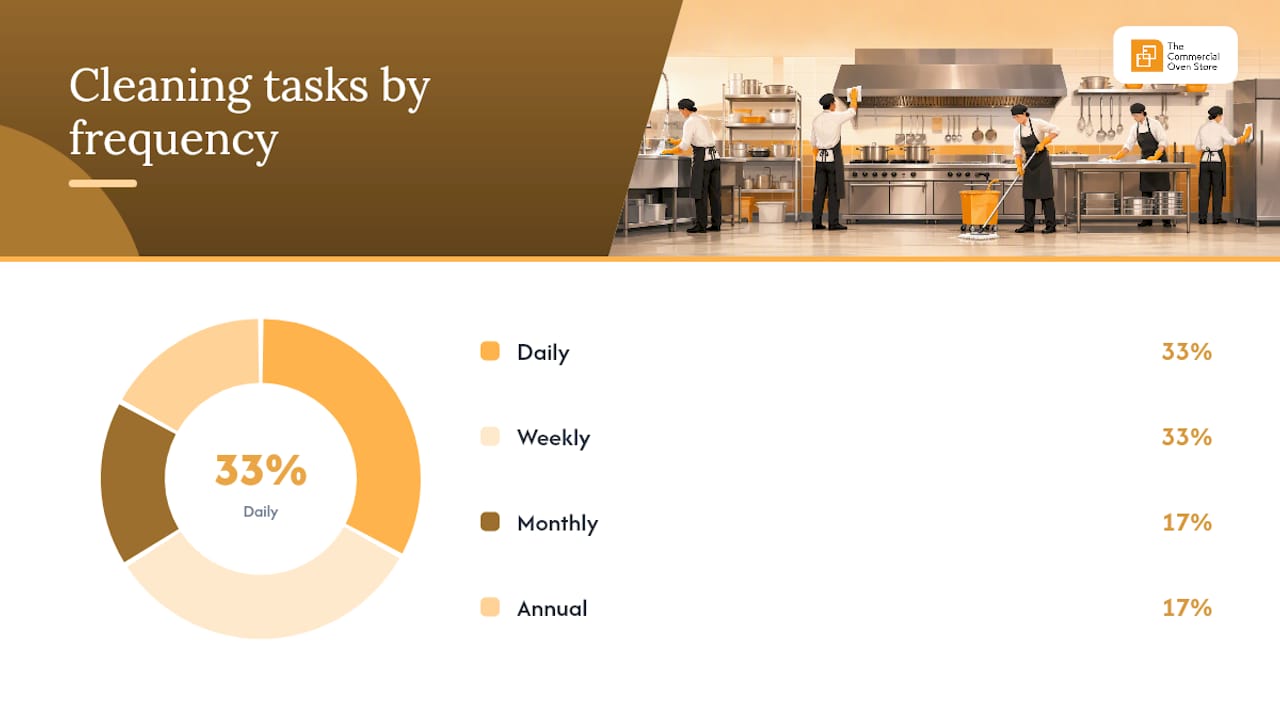
Industry guidance recommends daily automatic cleaning in commercial kitchens and warns that missed cycles lead to baked-on residue that harms airflow, sensors, and sealing over time. Here is a practical schedule for UK commercial kitchens.
Daily:
- Run a full CleanJet®+care or iCareSystem automatic clean after the last service
- Wipe door gaskets and check for damage
- Clear the drain cover of food debris
Weekly:
- Remove racks and runners; wash separately in a sink
- Inspect the door gasket closely for cracks, lifting, or grease build-up
- Check the fan guard for grease accumulation; wipe carefully
- Review tablet stock and reorder before running low
Monthly:
- Check door hinges for wear or misalignment
- Run a heavier cleaning programme if soiling levels have been high
- Inspect the steam generator area for visible scale
- Review your water hardness log and adjust Care tablet use if needed
Annual:
- Book a professional service and descaling visit through an authorised Rational engineer
- Provide the engineer with your tablet usage log and water hardness records
- Replace door gaskets if wear is evident
| Task | Frequency | Notes |
|---|---|---|
| Automatic clean (CleanJet®+care) | Daily | Use genuine detergent and Care tablets every cycle |
| Gasket wipe and drain check | Daily | Quick visual and wipe after service |
| Rack and runner deep clean | Weekly | Remove and wash separately |
| Fan guard inspection | Weekly | Soft cloth only |
| Door hinge and seal inspection | Monthly | Check for wear and misalignment |
| Professional service and descale | Annual (or as indicated) | Provide water hardness and tablet usage log |
Where can you buy genuine Rational cleaning products in the UK?
Buy genuine Rational tablets and parts from authorised UK suppliers. Using non-genuine products risks damage to the steam generator, voids the warranty, and disrupts the unit’s automated dosing logic. Parts Town UK and Thecommercialovenstore both stock the key items.
Recommended items with part numbers:
- Rational Detergent Tablets: part number 56.00.210 (available at Parts Town UK)
- Rational Care Tablets: part number 56.00.562 (available at Parts Town UK)
- Active Green Cleaner Tabs: part number 56.01.535
- Cleaner Tabs for SCC/CombiMaster Plus: part number 56.02.315U
Purchasing tips:
- Buy in pack sizes that match your usage volume — running out mid-week and substituting a different product is the most common cause of cleaning failures
- Store tablets in a cool, dry place away from food preparation areas
- Request a commercial invoice from your supplier; this supports warranty claims and service records
- Confirm supplier authenticity before ordering — authorised resellers can provide Rational documentation on request
Pro Tip: Keep at least one full pack of each tablet type in reserve. A busy kitchen that runs out of Care tablets mid-week will skip limescale protection for several cycles, and that accumulates quickly in hard-water areas.
What experienced kitchen technicians actually prioritise
Most cleaning failures in commercial kitchens come down to two things: skipped cycles and neglected gaskets. The automatic clean is not optional — it is the maintenance interval. Treating it as something to run “when there’s time” is how steam generators scale up and door seals fail prematurely.
The fan area and drain deserve more attention than they typically get. Grease in the fan guard reduces airflow and forces the unit to work harder; a partially blocked drain means residual water sits in the base and breeds odour. Neither takes long to check — thirty seconds with a cloth and a torch at the end of service catches problems before they become faults.
Logging tablet use matters more than most operators realise. When a service engineer arrives to investigate a steam fault or persistent residue, the first question is always about cleaning frequency and tablet type. A simple notebook or a line in the kitchen log takes seconds and gives the engineer the data to diagnose quickly rather than guess.
Thecommercialovenstore stocks Rational ovens, parts, and accessories for UK kitchens
Keeping a Rational combi oven clean is straightforward when you have the right tablets to hand and a reliable supplier for genuine parts. Thecommercialovenstore supplies Rational ovens and compatible accessories to commercial kitchens across the UK, with flexible payment options through iwocaPay that let you spread the cost of equipment or spares.
Whether you are sourcing a replacement Rational iCombi Pro, a Rational iCombi Classic, or simply need to restock cleaning supplies and accessories, the team at Thecommercialovenstore can advise on the right products for your kitchen size and usage. Visit Thecommercialovenstore to browse the full range or get in touch with a parts and equipment enquiry.
Sources
- Active Green cleaner tabs. | RATIONAL AG
- How‑To Clean a Rational SelfCookingCentre® | Parts Town UK (blog)
- Rational iCombi Pro Cleaning Instructions | Parts Town
- How to Clean Rational Oven Properly - islandcatering
Keep supplier invoices for all tablet and parts purchases. Authorised service bookings should go through Rational’s UK service network or an authorised reseller — your invoice records support any warranty or service claim.