

Programming a combi oven automates the cabinet climate, temperature, humidity and airflow, across multiple cooking phases so a dish comes out the same way every time it’s cooked. The immediate action: enter programming mode at the panel, select “New,” name the programme, set your first step, then save and run it. Done properly, this cuts manual checks during service and removes the guesswork that causes inconsistent plates.
TL;DR:
- Proper programming requires naming each recipe clearly and grouping them by category to prevent errors during busy service.
- Key parameters like cooking mode, humidity, fan speed, and probe settings must be precisely adjusted for consistent results across different dishes.
- Multi-level programming allows different items to cook simultaneously on separate racks, but load balancing is crucial to avoid flavor transfer and uneven cooking.
- Regular backups, clear version notes, and disciplined naming conventions help prevent accidental overwrites and simplify programme management.
- Initial tests should involve small adjustments within narrow ranges, with detailed documentation to refine recipes based on texture, moisture, and temperature logs.
Table of Contents
- How do you create and save a combi oven programme?
- What are the key parameters in combi oven programming?
- How does multi-level programming work across racks?
- How should you organise, back up and share your programmes?
- How do you test and refine a new programme?
- What do the icons on the control panel actually mean?
- How do you reset a combi oven and fix common faults?
- Bringing programming discipline into a working kitchen
- Buy, commission and train on a combi oven that’s built for programming
- Sources
- FAQ
How do you create and save a combi oven programme?
Every combi oven on the market, whether it’s a Rational iCombi, an Alto-Shaam Combitherm with CombiTouch, or a generic vendor unit, follows roughly the same logic: enter a programming menu, define a step, store it, run it. The button names differ. The sequence does not.
On Rational’s SelfCooking Center and iCombi Pro range, the standard route is to press Prog, then New, enter a name using the dial or touchscreen keyboard, pick a cooking mode, set your parameters, then hit Store to save the programme, according to PartsTown’s programming walkthrough. Combitherm’s CombiTouch interface works on a similar principle but leans on picture-based recipe tiles rather than a dial, letting you build and edit a recipe directly on the touchscreen, with room for roughly 250 saved slots complete with photos, per Alto-Shaam’s CombiTouch manual.
Here’s the sequence to follow at the oven, adapted for either control style:
- Enter programming mode. Look for a button or menu icon labelled Prog, Manual, or Add depending on your model. On touchscreen units, this is usually a “+” or “New Recipe” tile.
- Name the programme. Use the dial to scroll through letters, or type directly on a touchscreen keyboard. Keep it short and specific, “Roast Chix 1.8kg” beats “Programme 4.”
- Choose the cooking mode for step one. Convection, steam, or combination, whichever suits the dish you’re building.
- Set your parameters. Temperature, time or core probe target, humidity level, and fan speed all get defined at this stage.
- Confirm preheat settings if the oven prompts you. Some models preheat automatically before the first phase starts; others need this switched on manually.
- Press Store or Save. This locks the programme into memory, usually under a recipe group you can name or select.
- Run a test. Press Start and listen for the audible signal confirming the oven has reached temperature and begun the cycle.
That’s the whole loop for a single-phase programme. Multi-phase builds follow the same pattern, you just add a second, third, or further step before storing, which we cover in the next section.
Pro Tip: Name your first three test programmes with a version number, like “Roast Chix v1,” “Roast Chix v2.” When you tweak humidity or time during testing, you’ll always know which version is live on the floor, and you can roll back instantly if v2 turns out worse than v1.
One thing that catches out newer operators: pressing Start before Store. If you skip saving and just run the settings live, everything works fine for that one cook, but the programme vanishes the moment you clear the screen. Always store first, run second.
What are the key parameters in combi oven programming?
Every phase in a combi oven programme is built from five levers: cooking mode, temperature, humidity, fan speed, and probe or time control. Get these right and the rest of the programme looks after itself.
Cooking mode sets the baseline. Convection mode uses dry heat and is your default for roasting, baking, and browning. Steam mode injects moisture with little or no dry heat, ideal for delicate vegetables, poaching, and fast regeneration of pre-cooked items. Combination (or “mixed”) mode blends both, giving you the crust of convection with the moisture retention of steam, which is why it’s the workhorse setting for joints of meat, whole birds, and most bakery regeneration.
Humidity is where combi ovens earn their keep over standard convection units. Higher steam injection keeps proteins moist and slows crust formation; lower humidity, or none at all, lets surfaces dry out and brown faster. As a rough starting point:
- Roast chicken or pork joints: moderate humidity (around 30 to 50%) for the first phase, then drop it in the final phase to crisp the skin.
- Bread and bakery regeneration: high humidity at the start to prevent skinning, tapering off toward the end.
- Steamed vegetables or fish: full steam mode, little to no dry heat.
- Reheating pre-plated meals: moderate steam to restore moisture lost in the fridge or freezer.
Our guide to combi oven humidity control goes deeper into how steam levels change texture and browning if you want to fine-tune beyond these starting figures.
Fan speed governs airflow across the cabinet. Turn it down for soufflés, delicate fish, or anything that shouldn’t be buffeted around on the tray; turn it up when you want faster, more even browning on items like roasted vegetables or crackling. Most panels offer a range of speed settings, and dropping just one level can be the difference between a soggy edge and an even crust on a delicate item.
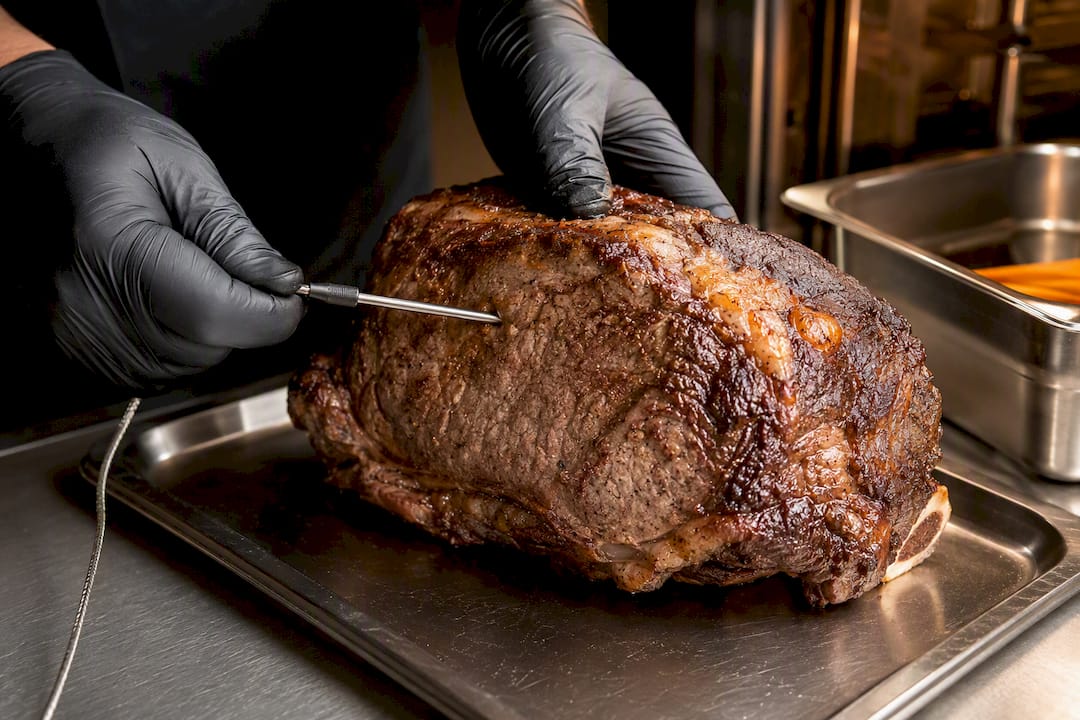
Core probe control replaces a fixed cooking time with a target internal temperature, which matters enormously for large joints where oven-to-oven variation in loading and starting temperature makes a timed cook unreliable. Push the probe into the thickest part of the meat, avoiding bone and fat pockets, and the oven will hold or step down automatically once the target is hit. A useful rule of thumb: use probe-driven steps for large joints and roasts, and time-driven steps for bakery and regeneration work, since combining both approaches inside one phased programme, as Rational’s iCombi Classic manual notes, gives you predictable texture alongside food safety assurance.
Pre-heating matters more than most kitchens give it credit for. Loading a cold or frozen item into an oven that’s still climbing to temperature extends cook time unpredictably and can leave the surface undercooked while the centre overshoots. Rational’s iCombi systems let you build programmes with multiple phases depending on the model, each carrying its own mode, time, temperature, humidity, and fan setting, according to the iCombi Classic programming manual, and a dedicated preheat phase as step one is standard practice for anything frozen or dense.
How does multi-level programming work across racks?
RackControl, or LevelControl depending on the manufacturer, lets you run different dishes on different shelves inside a single oven cycle, each finishing at its own time. Vendor documentation typically covers up to 10 levels, with programmes running in either direct or scheduled mode, and the ability to add a fresh dish partway through a cycle already in progress, per Combi-King’s IFU excerpts on multi-level functions.
This is the feature that turns a combi oven from a single-dish cooker into something closer to a service hub. Building one properly takes a bit more care than a standard programme:
- Set your general oven parameters first. Overall mode, base temperature, and humidity apply across all levels unless a specific level overrides them.
- Assign a dish to each level. Different items, say chicken thighs on level two and roasted carrots on level four, get their own finish time within the shared cycle.
- Choose direct or scheduled mode. Direct mode starts everything together; scheduled mode staggers start times so multiple dishes finish at the same moment despite different cook durations.
- Add dishes mid-cycle where needed. Most systems let you slot a new tray into a running programme and the oven calculates its own finish time against the current cycle.
- Watch for the level-complete signal. The panel indicates when an individual level has finished cooking, often while other levels continue running.
RackControl programmes frequently run on what vendors call “infinite time,” meaning the oven keeps operating and simply flags each level as it completes rather than shutting down on a fixed clock.
The catch is load balancing. Stack strongly flavoured items like fish or garlic-heavy dishes above delicate ones like custards or plain rice, and steam circulation will carry flavour and aroma between trays. Vendor guidance on RackControl is consistent on this point: flexibility during service comes with a real risk of uneven cooking and cross-flavour transfer if levels aren’t matched sensibly. Our piece on multi-level cooking and airflow priorities covers the loading logic in more depth if you’re building a service pass around several simultaneous dishes.
How should you organise, back up and share your programmes?
A combi oven with fifty unnamed programmes called “Recipe 12” and “Recipe 34” is worse than useless, it’s actively dangerous during a busy service when the wrong one gets pulled up by mistake. Structure matters as much as the settings themselves.
- Name programmes by dish and portion size, not by date or guesswork (“Beef Sirloin 200g” rather than “New 3”).
- Group by category such as menu section, dish type, or service moment (breakfast bakery, lunch mains, evening regeneration) so staff can find what they need without scrolling through everything.
- Use thumbnails where the control supports them. CombiTouch and similar picture-based systems let you attach a photo to each saved recipe, which speeds recognition under pressure far more than a text name alone.
- Export and back up regularly, typically via USB or a recipe management platform, before making bulk edits or running a factory reset. Overwriting behaviour varies by model, some ask for confirmation before replacing an existing programme, others don’t, so check before you save over something you’ll want back.
- Keep a simple version note alongside each backup: what changed, when, and who changed it.
Vendor manuals are consistent that certain deeper functions, full import/export, system settings, and service menus, are reserved for technicians and shouldn’t be touched by kitchen staff without training, according to Rational’s iCombi Pro operator manual. Back up your full programme library before any technician visit that involves a reset or firmware update. It’s also worth building cleaning cycles into the same organisational habit: our guide to combi oven cleaning explains how programmable rinse, light, and heavy cleaning cycles sit alongside your cooking programmes and why backing up before a heavy clean is good practice.
How do you test and refine a new programme?
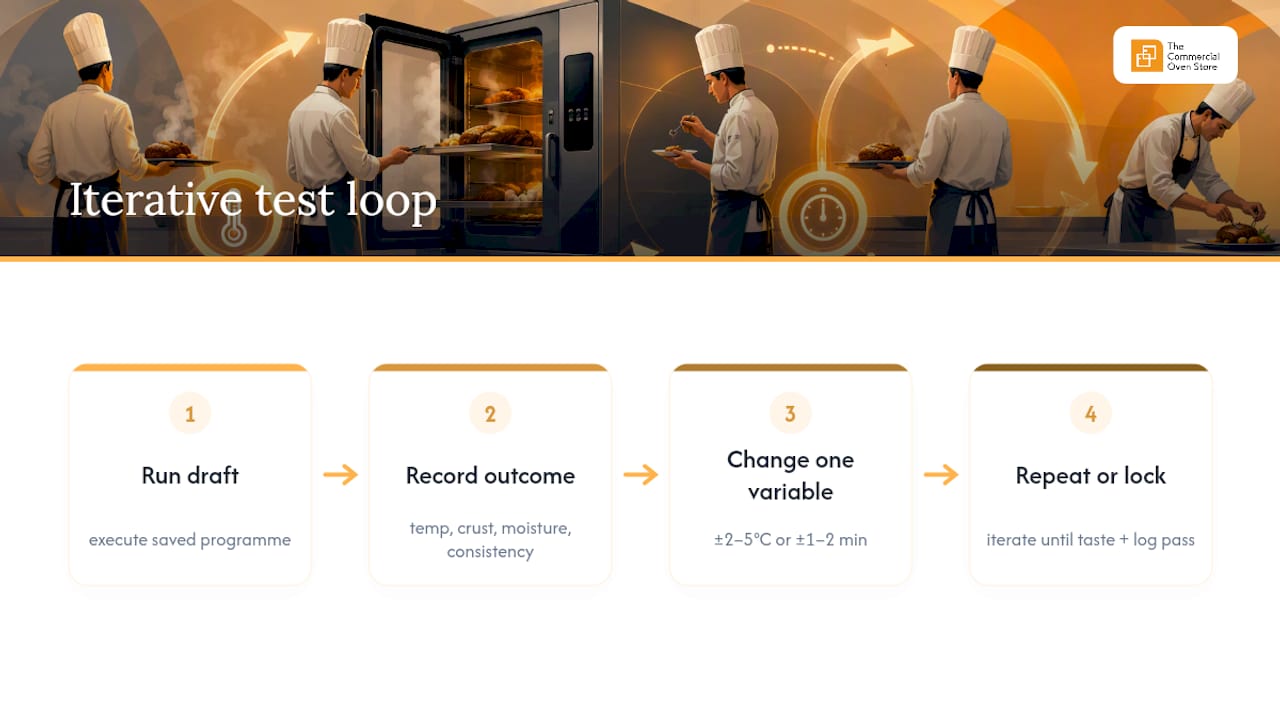
No programme is right the first time it’s saved. Treat the first run as a draft, not a finished product, and build your testing around single-variable changes so you always know what caused a result to shift.
Run the programme once, exactly as saved, and record the outcome: internal temperature at pull, crust colour, moisture, portion consistency across the batch. Change one thing, not three. If the skin isn’t crisping, drop humidity in the final phase before you touch temperature or time. If a joint is drying out before the centre hits target, that’s a fan speed or humidity issue in the earlier phase, not a reason to crank the overall temperature up.
Small adjustments go a long way. Most fine-tuning sits within a narrow band, roughly ±2 to 5°C on temperature and ±1 to 2 minutes on time per phase. Bigger swings than that usually mean the original programme structure was wrong, not that it needs a bigger nudge.
Pro Tip: Keep your probe logs and HACCP records next to your test notes, not in a separate system. When a programme passes both the taste test and the temperature log on the same run, that’s the version worth locking in and handing over to the rest of the team.
Treating programming as genuinely iterative, rather than a one-and-done setup task, is standard operator practice: initial saved programmes rarely need zero adjustment once real kitchen loads and ambient conditions come into play, per PartsTown’s operator guidance. Our combi oven cooking times guide walks through this adjustment process in more detail if you’re building out a full menu of programmes rather than a single dish.
Whoever finalises a programme should leave a short handover note for the next shift: what was changed, what the final settings are, and any loading instructions specific to that dish. A change log, even a scrappy one taped inside a cupboard door, saves the next chef from re-discovering the same mistake.
What do the icons on the control panel actually mean?
Combi oven panels lean heavily on pictograms because kitchens are loud, hands are wet, and nobody has time to read a paragraph of text mid-service. Learning to read them at a glance is worth the ten minutes it takes.
- A fan or propeller icon usually indicates fan speed settings, tap through the levels to reduce airflow for delicate items or increase it for browning.
- A droplet or wave symbol represents humidity or steam injection level, often shown as a percentage or a small bar graph.
- A thermometer with a needle is your core probe icon, tap it to view live probe temperature or set a target.
- A flame or coil symbol typically toggles between convection, steam, and combination modes.
- A clock icon switches between time-based and probe-based step control.
- A snowflake or “hold” icon on some models indicates a holding phase, keeping food at a safe serving temperature after cooking finishes.
CombiTouch and similar interfaces support locking the screen during a running cycle, a genuinely useful feature that prevents an accidental brush of the panel from cancelling a programme mid-service, and most units also let you pin favourites or recently used programmes to the home screen for quick access. Some panels support starting a programme from a specific phase rather than the beginning, handy if you’re re-running just the finishing crisp step on a batch that’s already been through its main cook. Auxiliary functions such as reduced power mode, useful for lowering kitchen power peaks during heavy service, and configurable cleaning cycle intensity are usually tucked into the same settings menu, alongside your cooking recipes, according to Alto-Shaam’s CombiTouch documentation.
How do you reset a combi oven and fix common faults?
Most control panel issues clear with a soft restart before anything more drastic is needed. Work through these steps in order:
- Power cycle the unit. Switch off, wait a full minute, switch back on. This resolves the majority of frozen screens or unresponsive panels.
- Check the probe connection. A loose or partially seated core probe plug is one of the most common causes of an error message that looks far more serious than it is.
- Check water supply and drainage. Low water pressure or a blocked drain triggers steam-related error codes on most models, so confirm the supply valve is open and the drain isn’t backing up before assuming a component failure.
- Look for a fan or airflow fault code. These often point to a blocked vent or debris in the fan housing rather than a motor failure.
- Only move to a factory reset if a soft restart and the checks above don’t resolve it. A factory reset wipes saved programmes and custom settings back to the manufacturer default, so export or back up your programme library first wherever the model allows it.
- Stop using the oven and contact authorised service if you see repeated error codes after a reset, any burning smell, or a fault tied to gas or electrical supply. These aren’t user-fixable and pushing on regardless is a genuine safety risk.
Reserved technician functions, full system resets, firmware updates, deep service diagnostics, sit outside normal kitchen access on most units, and manufacturers are consistent that these should only be touched by authorised service engineers, per Rational’s iCombi Pro manual.
Bringing programming discipline into a working kitchen
Rolling out proper programming across a kitchen is less about the technology and more about habit. When a team first moves from eyeballing cook times to relying on saved programmes, the biggest hurdle isn’t the oven, it’s getting every chef on a shift to trust the stored settings enough to stop hovering over the door checking.
Training works best in short, repeated bursts rather than one long session. Show one chef how to build, save, and test a single programme properly, let them run it for a week, then have them show the next person. That peer-to-peer handover embeds the naming conventions and version habits far better than a manual ever will.
The measurable gains show up fast: fewer plates sent back for under or overcooking, less time spent physically checking the oven mid-service, and a kitchen that can bring on a newer chef without weeks of shadowing before they’re trusted on the pass, especially when supported by tools like the CaterFlow AI co-pilot that optimize kitchen workflow and scheduling. The one thing that erodes all of it is discipline slipping, someone saving over a working programme without a version note, or running settings live without storing them first. Keep that discipline tight across every shift, not just the one that built the programme, and the consistency holds.
— Simon
Buy, commission and train on a combi oven that’s built for programming
Getting the parameters right on a used or badly maintained oven is an uphill fight no amount of programming skill can fully fix. Thecommercialovenstore stocks a genuine range of combi, convection and speed ovens from manufacturers including Rational and Unox, built with the control precision that makes phased programmes, probe cooking and multi-level RackControl actually reliable in daily service.
Beyond the sale, some teams support installation, commissioning and staff training to help new ovens run proper programmes more quickly. Flexible payment options are available to help manage the upfront cost for kitchens needing an upgrade sooner. If you’re weighing up whether an iCombi Pro or a Bakerlux fits your service better, get in touch through Thecommercialovenstore to arrange a site visit or a straight quote.
Sources
- IFU: Rational iCombi Classic programming and user manual (extracted)
- How to program a Rational combi oven — PartsTown guide
FAQ
How do I operate a combi oven?
Select your cooking mode, set temperature, humidity and fan speed, then either run those settings live or save them as a named programme for repeat use. Most models guide you through a preheat phase automatically before the main cook begins.
What are the downsides of a combi oven?
Combi ovens cost more upfront than standard convection units and need a water supply and drainage connection, plus regular descaling and cleaning cycles to keep steam performance consistent. They also carry a steeper learning curve for staff before phased programmes and probe cooking become second nature.
Is there a universal oven symbol guide?
There isn’t a single universal standard across manufacturers, but most panels use recognisable conventions: a fan icon for airflow, a droplet or wave for humidity, and a thermometer for core probe settings. Check your specific model’s IFU for exact icon meanings, since Rational, Alto-Shaam and other vendors vary in detail.
How do I reset my Rational combi oven?
Try a soft restart first, power off, wait a minute, power back on, and check the probe connection and water supply before assuming a fault. A full factory reset should only follow if that doesn’t resolve the issue, and it wipes saved programmes, so back up your recipe library beforehand via USB or ConnectedCooking.